PET PROJECT
A set of tools, skills, and an MCP that let AI agents write and debug Commodore PET software — BASIC and 6502 assembly — on the VICE emulator.
▸ On the Commodore 64? There's a sibling toolset: PROJECT64.
── WHAT IS IT ──
The Commodore PET was where a generation learned to program. PET Project brings it back — not just for nostalgia, but as a place an AI agent can actually build, run, and debug real 8-bit software end to end.
It drives the open-source VICE emulator through a clean command line (every command speaks JSON) and an MCP server, and includes the machine knowledge — skills, memory maps, a tested cookbook — that an agent needs to get it right.
── CAPABILITIES ──
Boot any PET model (2001–8296) headless, in warp, with a disk attached.
Assemble 6502 with cc65 or tokenize BASIC; load and RUN in one step.
Symbolic breakpoints and watchpoints, single-step, memory and register inspection.
Block until screen text appears, memory hits a value, or a checkpoint fires.
Create images, copy files in and out, attach and boot — via c1541.
Identify the ROM set and disassemble live memory with symbol annotations.
Boot, load, feed input, assert on screen / memory / registers. CI-ready.
~30 MCP tools plus skills, memory maps, and a tested recipe cookbook.
── QUICK START ──
Needs Python 3.11+, VICE 3.5+, and the cc65 suite.
# macOS
brew install vice cc65
pip install -e .
Then drive an emulated PET:
pet session start --model pet4032 # boot a PET 4032
pet run game.s                    # assemble + load + RUN
pet screen                        # read the screen as text
pet break add start               # symbolic breakpoint
pet wait --break                  # block until it fires
pet step 5 && pet reg             # single-step, inspect
Every command takes --json — the interface an agent uses.
── USE WITH AN AI AGENT ──
Any agent with a shell needs zero setup — the CLI plus
--json is the whole integration. For MCP-native clients,
pet-tools-mcp exposes the same operations. Step-by-step setup for
Claude Code, OpenAI Codex, Cursor, Gemini CLI and Google Antigravity is in the
guide — every step works on macOS and Linux.
── PLAY THE DEMOS ──
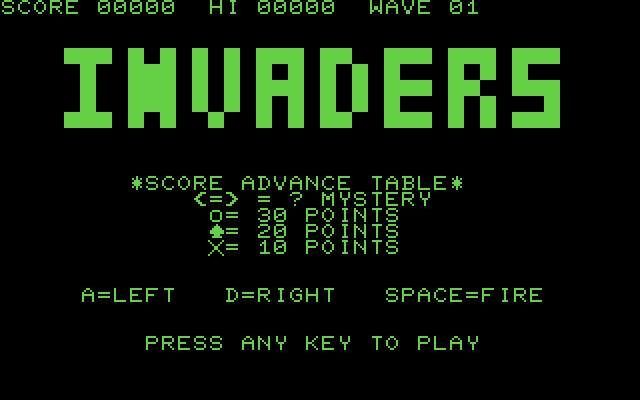
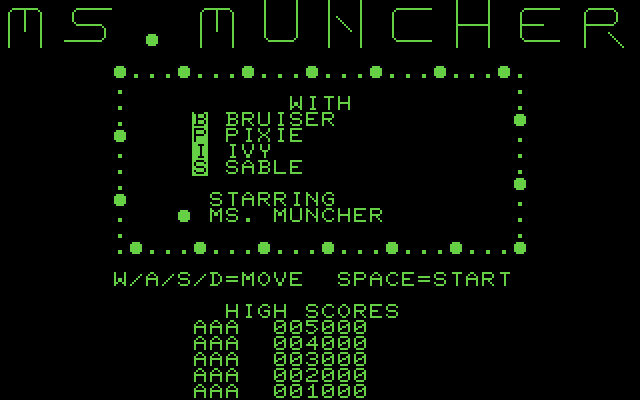
The two flagship demos run in your browser on an emulated PET
(ROM 4.0, 40 columns) — the same .prg files
checked into the repo, on the play page.
── DEMOS: TRY IT! ──
Ready-to-paste prompts, graded from a first BASIC program up to an arcade-faithful Invaders in assembly. Each is validated by handing it to a real agent and confirming the result. 01–05 passed on the first attempt; 06 took one follow-up fix.
| # | Demo | Language | Status |
|---|---|---|---|
| 01 | Guess the number | BASIC | [OK] passed |
| 02 | Bouncing ball | BASIC | [OK] passed |
| 03 | Sieve benchmark | BASIC + asm | [OK] passed (asm 93x faster than BASIC) |
| 04 | Snake | 6502 assembly | [OK] passed |
| 05 | Debug hunt | BASIC + debugger | [OK] passed |
| 06 | Invaders | 6502 assembly | [OK] passed after 1 fix (playable .d64 in the repo) |